
⚡ Time Saver & Batch Creation (Creator Edition)
Quickly generate multiple themed puzzles with different settings — all in one go.
🗂️ Required Module
- ✅ Puzzle Maker Pro – Tents and Trees – Creator Edition only
- ✅ Puzzle Maker Pro v2025.13.0.1 or later
🛠️ Preparation
Before using Time Saver:
- Create and save a few puzzle presets with different:
- Icons (tent/tree themes)
- Grid sizes and difficulty levels
- Styling/branding options (optional)
- Make sure you know where your output folder is set
🔢 Step-by-Step Instructions
1. Enable Time Saver Mode
- Open Puzzle Maker Pro
- Select:
Puzzle Type → Tents and Trees (Licensed) - Go to the Time Saver tab
- Check
Use Time Saver to generate puzzles
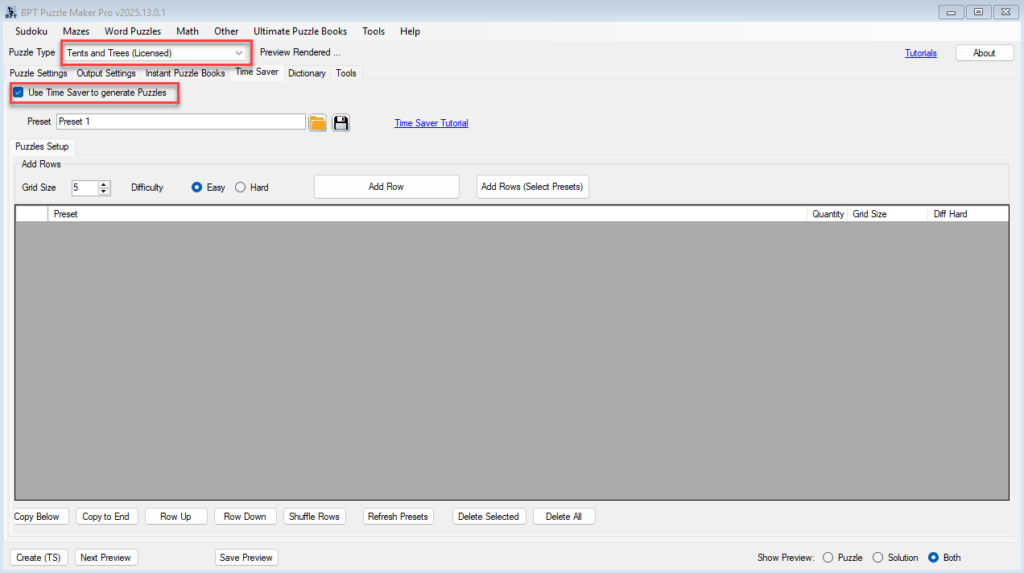
2. Add Puzzles to the Batch Table
➤ Option A: Add Default Row
- Select a Grid Size and Difficulty at the top
- Click
Add Rowto insert a puzzle using the current settings
➤ Option B: Add Multiple Presets
- Click
Add Rows (Select Presets) - Choose multiple preset names (e.g., “Cat Mouse 5×5”, “Dog Bone 6×6”)
- Each selected preset becomes a separate row
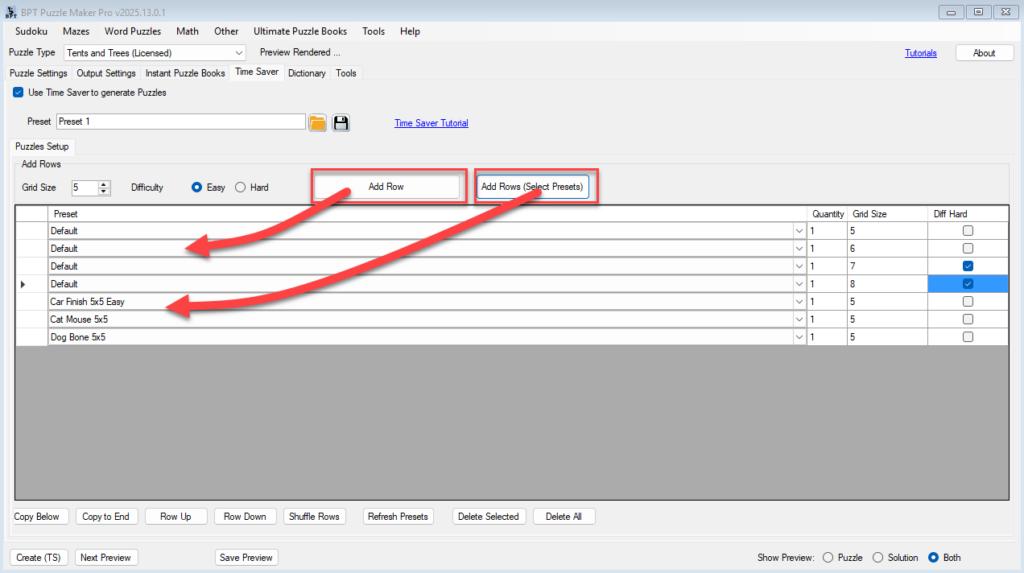
3. Customize Each Row (Optional)
- In the table, edit:
- Preset (dropdown)
- Quantity (number of puzzles to create)
- Grid Size (5–10)
- Diff Hard (check to enable Hard difficulty)
- You can mix Easy and Hard puzzles across rows
4. Organize the Table
Use the bottom row tools to:
- 🔁 Shuffle Rows (great for variety)
- 🆙 Row Up / Down to rearrange puzzles
- 📋 Copy Below or Copy to End to duplicate rows
- 🔄 Refresh Presets (if you’ve just saved new ones — list is only loaded once)

5. Create Your Batch
- Confirm your Output Settings and Branding are correct
- Click
Create (TS)at the bottom left - All puzzles in the table will be created at once using your settings
🎉 Outcome
You’ve now created a batch of Tents and Trees puzzles, each with its own theme, size, and difficulty. This is perfect for:
- Rapid book creation
- Holiday or seasonal puzzle packs
- Personalized puzzles for clients or classrooms